Pingar Content Insight
Case Study
Pingar Content Insights is a unique product that provides knowledge workers with a holistic view of their content landscape.
OVERVIEW
In most organisations, content is distributed across multiple silos such as SharePoint, OneDrives, Dropbox, Network File Shares.
Enterprise Search solutions tend to facilitate the discovery of information across silos, but the end-user has to know what they are looking for. Reporting and visualisation platforms like Power BI, and Tableau help organisations build visual analytics over their digital assets, but these platform require data analytics skills.
DiscoveryOne Content Insights provides information managers and knowledge workers the best of both worlds, namely governance, search and insights across their entire content landscape.
Timeline
My Role
Tools
2 Months(Oct-Dec 2021)
2 Months(Oct-Dec 2021)
I took the entire part from user research, UX, and visual design.
Figma, Adobe Illustrator

01 — Research Process
Customer concerns
I — we want to automate some of our document related processes
“duplicate data in our information systems is highly likely”
2 — Our documents are scattered over multiple repositories; sharePoint, Live link and Windows File Shares
“we have no visibility of data to drive user behaviour”
3 — Our ECM search is crap!
“we are planning to migrate to new EDRMS system, but don’t want to do a mere lift and shift”
4 — Our intranet search is not working!
“we want manage our records better, but we can’t keep training users!”
Competitive Analysis
I started the project by analyzing competitors to see what problems are out of the market so that I can define those problems as a starting point.

POWER BI
FEATURES:
Cost, easy to use, frequent updates, can read data from Microsoft Excel and text files like XML and JSON, ability to save data to Excel etc.
PROBLEMS:
Very bulky user interface, rigid formulae, not able to work with huge amounts of data, table relationship not clear to users etc.
Tableau
FEATURES:
Remarkable Visual Image Capabilities,Ease of Use,Multiple Information Supply Connections, Multiple Information Supply Connections etc.
PROBLEMS:
High Cost, Inflexible Valuation, Poor After-Sales Support, Security Problems, Poor BI Capabilities etc.
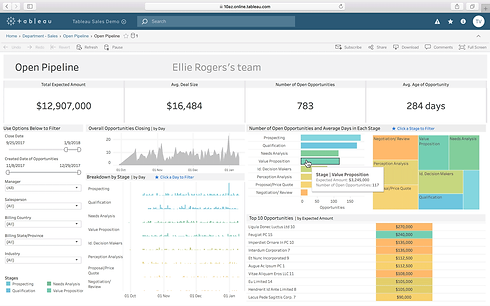
User Interview
Identifying users pain points and finding out essential features from those
I interviewed Pingar Content Insight product Owner and their team about the problem statement and tried to have the exact idea about the requirements. From this, I found these key insight:
HKAA have implemented market analytics solution which has two main components: Illuminfo, from HCL technologies and DiscoveryOne from Pingar. Illuminfo is a reporting and visualizations platform which lets users generate various graphs, reports and extracts on auto-classified content fed from DiscoveryOne. DiscoveryOne monitors content feeds from various RSS sites such as future travel experience, skift, aviation news etc., and classifies content according to HKAA’s functions and activities. The classified content along with rich metadata is channeled into Illuminfo for reporting and visualizations.
Proposal
Pingar has proposed that it will build insights piece by themselves, and make the solution complete with end-end integration with DiscoveryOne.
The proposal carries two parts:
-
Faceted search and
-
Reporting and visualizations
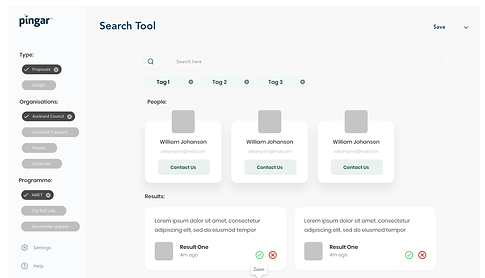
Sample faceted search experience

Sample reporting experience
Deliverables
-
A web app which is accessible to both Pingar & HKAA users to feel the proposed experience
-
A showcase of faceted search and visualizations based on HKAA relevant data (we will provide a database dump with HKAA data)
-
Design approach which is technology agnostic; can be converted into a generic tool at later stage
HKAA previously expressed their praise for visualizations that DiscoveryOne once supported (they have been deprecated in the latest editions). Here are some samples:


02 — Design Process
User Persona
For the Proof of Concept, we needed to define different roles or 'personas' to understand the different journeys to map. The personas are:
Insights Administrator
-
Raised privileges
-
Configures insight projects for
-
target user audience
-
Identifies filters for each
-
metadata collection and
-
configures/manages them
Insights Analyst
-
Standard privileges
-
Discovers key and actionable
-
insights specific to the
-
organisational context
-
Searches for documents
-
through pre-configured filters
-
in their domain of interest
-
Generates content
understanding reports relating
to a function or an activity. E.g.,
the HR function might want to
look at policy documentation
spread over multiple
repositories. The Insights
Analyst facilitates this by
generating reports for specific
document types i.e., Policy -
Saves useful searches for later
reference
Compliance Manager
-
Raised privileges
-
Identifies any compliance
-
discrepancies and initiates
-
corrective action
-
Exports pdf reports and shares
-
compliance information with
-
other organisational
-
stakeholders
User Flow
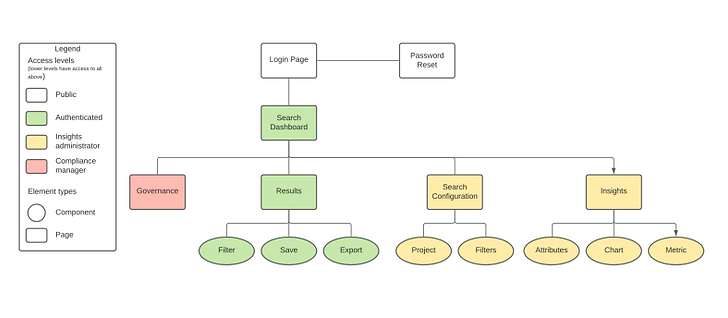
I separated the overall flows into 4 stages. Onboarding for user data collecting, searching & advance filtering, results analysing and Insights
.png)
Site Map

Product Mind Map
Wireframes
To illustrate how this web application operates, wireframes have been
designed to show the functionality and the overall look and feel of the
application. The section over the page illustrates the user flow for the three defined personas.
The next section then shows the design of the steps within the flow to
illustrate the possible final product.


Rough sketch on Micro Board
Current Version
Functions Pingar is frequently using:
-
Search by date
-
Word search
-
Advanced search
-
Search by taxonomies individually or in combination (AND/ OR logic is important!) Capture shared to HCL at the early stage
-
Capability in combining the above searches
-
Sorting by date
-
Account-based setting with individuals having some degree of “privacy”.
-
Segregating English news, English internal reports, English external reports, Chinese news, Chinese internal reports, Chinese external reports. In particular, we have PDF files under English news and Chinese news, which are articles we downloaded and saved as PDF.
-
Visualization – mainly Key Phrase tag cloud and stream graph
-
Export function (articles and their key attributes)
-
Client tag – a function that adds manual tags on articles, without impacting the original classifications, e.g., good article, please follow up
-
Channels – quick way to check for saved searches.

.png)
.png)
02 — Design Solution
Low Fidelity Designs
Taking a super collaborative approach, I involved engineers and leadership at every turn - making sure everything we produced was technically viable but also represented the direction the company and market was headed. Working across hemispheres, a big part of my approach was sketching, prototyping and video feedback.

Authentication

Advance Search

Result Page

Landing page( Search)

Advance Search Filters

Filter Configuration
High Fidelity Designs
Taking a super collaborative approach, I involved engineers and leadership at every turn - making sure everything we produced was technically viable but also represented the direction the company and market was headed. Working across hemispheres, a big part of my approach was sketching, prototyping and video feedback.


04 — Conclusion
Next Steps
Build metrics for measuring success on a new feature
Future functions that Pingar might expects to see (feasibility evaluation)
-
Group permission – creating small “private groups” consisting a few members. Configurable (by admin) on sources to be included, able to tag/ share articles between members, group chat and etc.
-
Similar to a) because we may extend it to the Authority, then the unit will become departments (may or may not introduce the group permission to other departments depending on management decision)